
1- Note the MAC address displayed on your screen
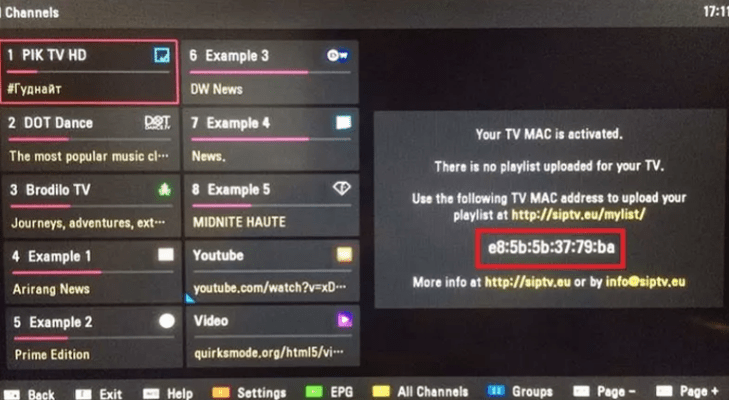
2: Visit www.siptv.eu/mylist on your mobile / PC web browser.
3: Enter the MAC address displayed on the TV and the .m3u url you received from us and click send
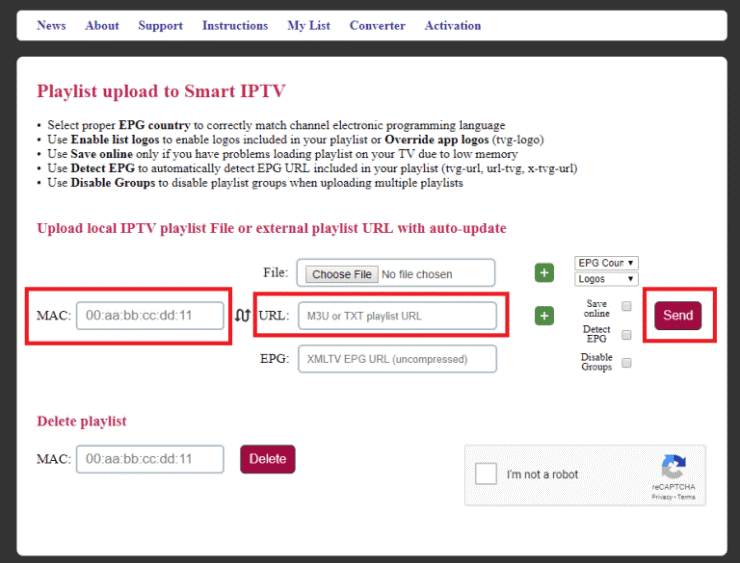
4: Wait until you receive the pop-up that says “1 URL added!” Restart your application. “
5: Launch the Smart IPTV again and wait for a few minutes to load all the IPTV channels.
(do not click on ok let the application count until the end)
NB: After installing the application, its use is free for 7 days only, after which you have to buy this app for 5,49EUR / lifetime
Go to http://siptv.eu/activation/ and activate it for life.


